
Download CoPay Mobile APK – banking app, financial management, mobile banking, money transfer, IMPS, NEFT, recharge, passbook, mPIN, Android app
Overview
CoPay Mobile is a free Android application designed to bring modern banking capabilities directly to users' smartphones. Developed by Cherrylabs, the app enables individuals to manage their financial activities remotely with ease. It serves as a centralized platform for accessing bank accounts, performing money transfers, and tracking transaction history. The primary purpose of CoPay Mobile is to simplify daily banking tasks by consolidating essential financial tools into a single, intuitive interface.
Target users include individuals who rely on digital banking services, especially those in regions where mobile-based financial solutions are gaining traction. The app supports multiple CoPay-enabled bank accounts, allowing users to link and manage several accounts from one interface. This functionality is particularly useful for users who maintain separate accounts for personal, business, or savings purposes.
Real-world usage scenarios include transferring funds via IMPS and NEFT, recharging mobile and DTH services, checking account balances, and reviewing passbook entries. The app is intended for users seeking a convenient, secure, and reliable way to handle financial operations without visiting a physical branch. While the developer did not provide additional details about the company’s background, the app’s functionality and design suggest a focus on accessibility and user-centric banking solutions.
Key Features & Capabilities
- Multi-Account Management: Users can link and manage multiple CoPay-enabled bank accounts within a single application, streamlining access and reducing the need for multiple banking apps.
- Instant Money Transfers: The app supports real-time fund transfers using IMPS (Immediate Payment Service) and NEFT (National Electronic Funds Transfer), enabling quick and secure transactions between bank accounts.
- Recharge Services: Users can recharge mobile phones, DTH subscriptions, and other utility services directly through the app, eliminating the need for third-party platforms.
- Account Balance & Transaction History: Real-time access to current account balances and detailed transaction records allows users to monitor spending and financial activity.
- Passbook View: A digital passbook feature provides a chronological record of all transactions, offering transparency and aiding in personal financial tracking.
- mPIN Security: After registration, users set up a personal mPIN to authenticate transactions and protect sensitive account data.
These features collectively support everyday financial needs, such as paying bills, sending money to family, or managing business expenses. The integration of IMPS and NEFT ensures compatibility with India’s core banking infrastructure, making it suitable for users across various regions. The ability to register using a mobile number, bank ID, and account number simplifies onboarding. The app’s design emphasizes efficiency, allowing users to complete critical tasks in minimal steps.
User Interface, Workflow & Performance
CoPay Mobile features a clean, responsive user interface tailored for mobile devices. Navigation is structured around core functions—account overview, transfers, recharges, and passbook—accessible through clearly labeled menus. The layout prioritizes readability and quick access, with icons and text arranged to minimize user confusion.
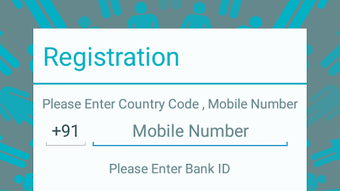
Workflow efficiency is evident in the registration process, which requires only basic account details and a mobile number. Once registered, users set up an mPIN and gain immediate access to core services. The app’s performance is expected to be smooth on compatible devices, given its lightweight nature and optimized design. However, exact performance details were not specified.
The developer did not specify resource usage details, so CPU and RAM behavior cannot be confirmed. Stability is assumed based on standard mobile application development practices. The app’s responsiveness may vary depending on device hardware and network conditions. No performance benchmarks were provided, but general software behavior patterns suggest consistent operation under normal usage conditions.
Compatibility & System Requirements
CoPay Mobile is designed for Android devices running version 4.0 or higher. The app requires a screen size of at least 4 inches and a 1GHz dual-core processor. Minimum system memory is 1GB of RAM, and users must have at least 8MB of free disk space for installation. The application size is 22.1 MB, indicating a lightweight footprint suitable for a wide range of Android devices.
Compatibility information was partially provided. While the app is confirmed to work on Android 4.0+, the developer did not specify support for newer versions beyond the stated minimum. No details were given regarding tablet compatibility or device-specific optimizations. The developer did not provide additional system requirements, so users are advised to ensure their device meets the listed specifications before installation.
Pros and Cons
Pros
- Free to download and use, reducing financial barriers to entry.
- Supports IMPS and NEFT for fast, reliable money transfers.
- Centralized management of multiple bank accounts in one app.
- Integrated recharge services for mobile and DTH subscriptions.
- Secure mPIN authentication for transaction protection.
- Lightweight design with minimal disk space usage.
Cons
- Compatibility limited to Android 4.0 and above, excluding older devices.
- Exact performance and resource usage details were not specified.
- Only available for Android, with no support for iOS or other platforms.
- Registration requires bank-specific details, which may limit accessibility.
- Developer did not provide information about future updates or support timelines.
FAQ Section
Is CoPay Mobile available for iOS devices?
CoPay Mobile is currently available only for Android devices. No information was provided regarding iOS compatibility or future plans for other platforms.
Is the app secure for financial transactions?
The app uses an mPIN for authentication, which adds a layer of security during transactions. However, the developer did not provide specific details about encryption protocols or data protection measures.
Can I use CoPay Mobile without an internet connection?
CoPay Mobile requires an active internet connection to access account data, perform transfers, and complete recharges. Offline functionality was not mentioned in the provided information.
How often does the app receive updates?
The release date for version 2.5.1 is March 15, 2024. However, the developer did not specify update frequency or release schedule.
What kind of license does CoPay Mobile have?
CoPay Mobile is offered as a free application. The license type was not disclosed, but it operates under a standard end-user license agreement typically associated with free mobile apps.
Final Thoughts
CoPay Mobile presents a practical, accessible solution for individuals seeking to manage their finances through a mobile device. Its ability to consolidate banking tasks—transfers, recharges, balance checks, and transaction tracking—into a single interface enhances convenience and efficiency. The app’s support for IMPS and NEFT ensures compatibility with India’s digital payment ecosystem, making it a reliable tool for daily financial operations.
While the app is limited to Android and lacks detailed technical disclosures, its lightweight design, free access, and focus on core banking features make it a strong contender in the mobile finance space. Users who value simplicity, security, and multi-account management will benefit most from this application.
Download CoPay Mobile now







